Disclosure: As an Amazon Associate, OfficialToddlerTech earns from qualifying purchases. This does not affect the price you pay.
If you are comparing the best digital microscopes for kids, the biggest question is usually not whether the magnification number looks impressive. It is whether the microscope is simple enough for a child to handle, flexible enough for your setup at home, and clear about what comes included versus what might cost extra later. This guide focuses on the exact Amazon listings you selected and translates their specs into practical family use.
best digital microscopes for kids should be compared by setup, included accessories, ongoing costs, compatibility, and the real situations in which a family will use each option.
Best Digital Microscopes For Kids: What Parents Should Compare
Quick Picks
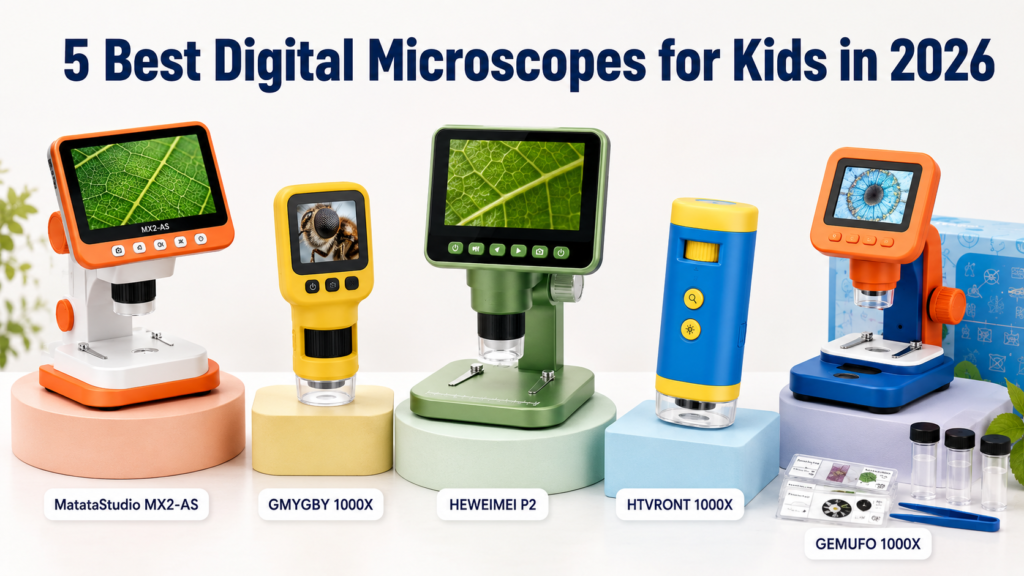
Best overall for a built-in screen and app flexibility: MatataStudio MX2-AS Digital Microscope for Kids
Best for simple handheld use with recording: GMYGBY 1000X Handheld Digital Mini Microscope for Kids
Best for longer listed battery life: HEWEIMEI P2 1600X Digital Microscope for Kids
Best for a compact two-in-one design: HTVRONT 1000X Digital Handheld Microscope for Kids
Best kit for slides and specimen-making tools: GEMUFO 1000X Digital Microscope Kit for Kids
All five are listed for Ages 3+, but that does not mean every child at that age will find them equally easy to use. The right pick depends on whether you want a built-in screen, a kit with more accessories, or a model that stays simple and standalone.
Comparison Table
| Product | Magnification | Screen | Recording | Connection / Storage Notes | Age Guidance |
|---|---|---|---|---|---|
| MatataStudio MX2-AS Digital Microscope for Kids | 100X to 1600X | 4.3-inch 1080P LCD | Not stated in supplied features | Wi-Fi, USB-C, and app support; five prepared slides and two chambers included | Ages 3+ |
| GMYGBY 1000X Handheld Digital Mini Microscope for Kids | Up to 1000X | 2.4-inch IPS | Photo and video recording | Built-in 32MB storage; TF cards up to 64GB; USB transfer to Windows and Mac | Ages 3+ |
| HEWEIMEI P2 1600X Digital Microscope for Kids | 100X to 1600X | 4.0-inch IPS | 1080P photo and video | Computer connection optional for larger-screen viewing | Ages 3+ |
| HTVRONT 1000X Digital Handheld Microscope for Kids | 100X to 1000X | 2.0-inch HD | Photo and video recording | Built-in photo storage; SD card required for videos and not included; computer connection optional | Ages 3+ |
| GEMUFO 1000X Digital Microscope Kit for Kids | 200X to 1000X | 2.4-inch IPS | Photo and video recording | USB to computer or phone; TF card expansion support; eight prepared and four blank slides included | Ages 3+ |
Detailed Reviews
1. MatataStudio MX2-AS Digital Microscope for Kids
The MatataStudio MX2-AS is the most screen-forward option in this group, with a 4.3-inch 1080P LCD display and both handheld and stand viewing modes. That makes it appealing if you want a child to look directly at the microscope without immediately relying on a phone or tablet. It also supports incident and transmitted LED lighting, which is useful when you want to view different kinds of specimens, from opaque objects to thinner slide-style samples.
Parents may also appreciate the broader connection options. The listing says it works with Wi-Fi and USB-C output, and that the Matataxplore app supports phones and tablets, including Windows, iOS, and Android devices. The built-in screen can be used without an external device, which may simplify everyday use. The kit also includes five prepared slides, two observation chambers, a storage bag, and a USB-C cable, so you are not starting from zero.
The main limitation is that the supplied data does not clearly state photo or video recording features, so if saving observations is important, this is not the safest assumption to make. There is also a note that bundle details can change after a manual check, so buyers who want to match every included accessory should verify the selected version carefully. The listing states a 2600mAh rechargeable battery with more than three hours of use, but real-world runtime can still vary with settings and lighting use.
Key strengths:
- Largest built-in screen in this group
- Handheld and stand viewing modes
- Wi-Fi, USB-C, and app support for multiple device types
- Includes prepared slides, observation chambers, and a storage bag
Important limitations:
- Photo and video recording are not clearly listed in the supplied features
- App compatibility should be confirmed before purchase if wireless sharing matters
- Bundle details may change after a manual check
Buy this if: you want a built-in-screen microscope that can also connect to phones, tablets, or a computer.
Skip this if: you need explicit recording features or prefer a simpler standalone microscope with fewer variables.
2. GMYGBY 1000X Handheld Digital Mini Microscope for Kids
The GMYGBY handheld microscope is one of the more straightforward options here. It has a 2.4-inch IPS screen, photo and video recording, manual focus control, and eight adjustable LED lights with four brightness modes. For parents, that combination can be useful when you want a child to adjust focus and light without needing a separate app or device. The listing also mentions built-in 32MB storage plus support for TF cards up to 64GB.
This model stands out as a mostly self-contained microscope. The supplied availability note says no app, Wi-Fi, or subscription is required for normal standalone use, which may help if you want to avoid setup steps. A computer is only needed if you want to transfer saved photos or videos. The included battery is listed at 600mAh with about two hours of use, so this is a better fit for shorter observation sessions than for long stretches away from a charger.
The biggest buyer-regret risk is the storage setup. The listing says a TF memory card is not included and may be an additional cost. It also contains an internal inconsistency: the display is marketed as 4K while the built-in camera is listed as 2MP. That does not automatically make the product a bad fit, but it does mean parents should read the listing carefully and focus on the clearly stated hardware rather than the marketing language.
Key strengths:
- Simple standalone use with no stated app or Wi-Fi requirement
- Manual focus plus adjustable lighting
- Photo and video recording built in
- TF card expansion support if you want more storage
Important limitations:
- TF card is not included
- Listed battery life is shorter than some alternatives
- Display marketing and camera specification do not read as fully aligned
Buy this if: you want a handheld microscope that works on its own and records photos or videos without app setup.
Skip this if: you want a longer-runtime battery or do not want to think about optional storage expansion.
3. HEWEIMEI P2 1600X Digital Microscope for Kids
The HEWEIMEI P2 is another strong screen-first choice, with a 4.0-inch IPS display and 100X to 1600X magnification. The detachable three-in-one design and desktop, handheld, and portable viewing modes make it the most flexible form factor in this group for families who may want one microscope to do several jobs. It also includes six adjustable LED lights with three brightness levels, which can help when lighting conditions vary around the home.
For parents who want recording features, the listing does state 1080P photo and video recording. The availability note also says the microscope works with its built-in screen and that a computer connection is optional for larger-screen viewing, so it is not dependent on a separate device for normal use. The listed battery life is up to four hours, which is the longest runtime claim among these products.
The tradeoff is that the available data does not mention bundled slides, extra chambers, or storage accessories, so this is less of an all-in-one kit than some of the others. The listing also advertises 48MP photo capture and 1080P video; because that comes from the product listing, it should be treated as a manufacturer claim rather than a performance promise. If your main goal is a microscope kit with lots of add-ons, another model may feel more complete.
Key strengths:
- Flexible three-in-one design
- Longer listed battery life than the other options here
- Built-in screen with optional computer viewing
- Photo and video recording stated in the listing
Important limitations:
- No included slide bundle is listed in the supplied features
- Some photo quality wording is marketing language from the listing
- Accessory package may feel lean if you want a full starter kit
Buy this if: you want a versatile microscope with a built-in screen and the longest listed battery life in this roundup.
Skip this if: you want a kit that already includes slides or specimen-making extras.
4. HTVRONT 1000X Digital Handheld Microscope for Kids
The HTVRONT model is the most compact-feeling two-in-one option in the group, with a microscope and telescope design, a 2.0-inch HD screen, and 100X to 1000X magnification. It includes photo and video recording, built-in photo storage, twelve adjustable LED lights, and a portable lanyard, so it is built with mobility in mind. For families who expect a child to carry the device around the yard or between rooms, that can be a practical advantage.
The supplied note says the device can be used with its built-in screen and that a computer connection is optional for larger-screen viewing. It also states that no app, Wi-Fi, or subscription is required. That makes the device relatively simple to understand. The listing further says that a separate SD card is required to record videos and is not included, which is one of the clearest ongoing-cost considerations in this roundup.
The main drawback is the smaller screen. A 2.0-inch display may be perfectly fine for quick peeks, but it can feel cramped for a child who wants to inspect details for longer periods. The listing also markets the image quality as 4K, which should be treated as a product claim rather than a tested result. If you want a more complete starter bundle with slides or a bigger viewing area, there are stronger fits in this list.
Key strengths:
- Very portable design with a lanyard included
- No stated app or Wi-Fi requirement
- Built-in photo storage
- Twelve adjustable LED lights
Important limitations:
- Smallest screen in this roundup
- SD card required for video recording and not included
- Image-quality marketing claims should be read cautiously
Buy this if: you want a compact microscope that is easy to carry and simple to use.
Skip this if: you want a larger display or do not want to add a separate SD card for video recording.
5. GEMUFO 1000X Digital Microscope Kit for Kids
The GEMUFO kit is the best fit in this group for families who want more of a hands-on science set. It offers 200X to 1000X magnification, a 2.4-inch IPS screen, photo and video recording, a removable handheld microscope, and a stable desktop base mode. The included accessories are a real differentiator: eight prepared slides, four blank slides, specimen-making tools, and a portable lanyard. That makes it easier to move from simply looking at specimens to preparing them.
The connection options are also practical. The availability note says USB is used to transfer or display images on a computer or phone, there is no stated Wi-Fi or subscription requirement, and TF card expansion is supported. This can be a good middle ground for parents who want a screen but also expect a child to explore more independently with the accessory kit. The supplied note says the kit contains 12 slides total, which is helpful to know if you are trying to compare value in terms of starter materials.
The main limitation is that the screen is still fairly small compared with the largest model in this roundup, and the product is not described as having the same broad app ecosystem as the MatataStudio option. There is also no listed battery runtime in the supplied features, so buyers should not assume long sessions away from power. If your family is most interested in a full beginner science kit rather than the largest display, this is a strong contender.
Key strengths:
- Best accessory bundle in this roundup
- Handheld and desktop use
- USB transfer/display support plus TF expansion support
- Includes both prepared and blank slides
Important limitations:
- Smaller screen than the largest-screen option here
- No listed battery runtime in the supplied data
- App and wireless ecosystem are not emphasized
Buy this if: you want a microscope kit that includes slides and specimen-making tools.
Skip this if: you want the biggest built-in display or a more app-centered experience.
How to Choose
When comparing the best digital microscopes for kids, it helps to think less about the biggest magnification number and more about how your family will actually use the device. A higher magnification range can be useful, but younger children often benefit more from an easy screen, stable lighting, and a form factor that is not frustrating to hold.
Here are the main questions to ask before buying:
- Do you want a built-in screen or app-based viewing? Some families will prefer the independence of an on-device screen. Others may want wireless or USB sharing.
- Will the child use it mostly at a desk or while moving around? Desktop base modes can be helpful for steady viewing, while handheld models are easier to carry outside.
- Do you care about photo and video capture? Some models clearly list recording, while others focus more on live viewing.
- Are extras important? Slides, chambers, and specimen-making tools can make a microscope feel more like a science kit, but they are not included equally across all five products.
- Do you want to avoid add-on costs? Check whether a TF card, SD card, or other storage accessory is required separately.
For parents of younger children, the simplest choice is often the one with the fewest setup steps. For older kids or families planning more frequent projects, a kit with recording, storage expansion, and extra slides may be more satisfying. In either case, the best match is the one that fits your household routine, not just the spec sheet.
Frequently Asked Questions
What age are these microscopes for?
All five listings are filtered here as Ages 3+, but age labels should be treated as internal guidance rather than a guarantee that every child will be ready for independent use. A younger child may still need hands-on help with focusing, lighting, and keeping track of small pieces.
Do any of these require an app?
The MatataStudio model supports an app for phone and tablet viewing, but the supplied note says the built-in screen can be used without an external device. The other four listings do not state that an app is required for normal standalone use.
Which microscope is easiest for a child to use by itself?
The easiest option depends on your child, but the GMYGBY and HTVRONT models are especially straightforward because they are self-contained and do not state app or Wi-Fi requirements for normal use. If you want a larger screen, the MatataStudio and HEWEIMEI options are more comfortable to view on-device.
Do I need extra storage?
Maybe. GMYGBY supports TF cards and has built-in storage, but a TF card is not included. HTVRONT says an additional SD card is required for video recording and is not included. GEMUFO supports TF card expansion, and the MatataStudio and HEWEIMEI listings do not clearly state the same storage requirements in the supplied information.
Can these connect to a computer?
Yes, several can. MatataStudio lists USB-C output support, GMYGBY supports USB transfer to Windows and Mac, HEWEIMEI and HTVRONT both mention computer connection for larger-screen viewing, and GEMUFO supports USB connection to a computer or phone. Check the selected version if you want a specific connection type.
Final Recommendations
If you want the best all-around screen experience, the MatataStudio MX2-AS Digital Microscope for Kids is the strongest first stop because it combines the largest built-in display with multiple viewing modes and broader connection support.
If you want the simplest standalone handheld choice, the GMYGBY 1000X Handheld Digital Mini Microscope for Kids is a practical pick, especially if photo and video recording matter more than a large screen.
If your main priority is flexibility and longer listed battery life, the HEWEIMEI P2 1600X Digital Microscope for Kids is a strong option. If portability is more important, the HTVRONT 1000X Digital Handheld Microscope for Kids keeps things compact, though the smaller screen and extra SD card need are worth noting. And if you want a more complete starter science kit, the GEMUFO 1000X Digital Microscope Kit for Kids has the most useful accessory bundle.
For many families, the right choice will come down to one tradeoff: a larger, easier-to-view screen versus a fuller kit with more accessories. That is why the best digital microscopes for kids are not always the ones with the biggest numbers. They are the ones that fit how your child will really explore.
Last updated: June 2026
OfficialToddlerTech participates in the Amazon Services LLC Associates Program. As an Amazon Associate, we earn from qualifying purchases. Product prices and availability may change. Please check the retailer page for the latest details.