Disclosure: This article contains affiliate links. As an Amazon Associate, we earn from qualifying purchases at no additional cost to you.
Choosing the best tablets for kids can feel surprisingly complicated. Parents are not only comparing screen size and price. They also need to consider parental controls, accidental purchases, inappropriate content, durability, battery life, app availability, and whether the device will remain useful as their child grows.
Some families want a simple child-ready tablet with a protective case and parental controls already included. Others prefer an iPad or Android tablet that offers more apps, school compatibility, drawing tools, video calls, and longer-term flexibility.
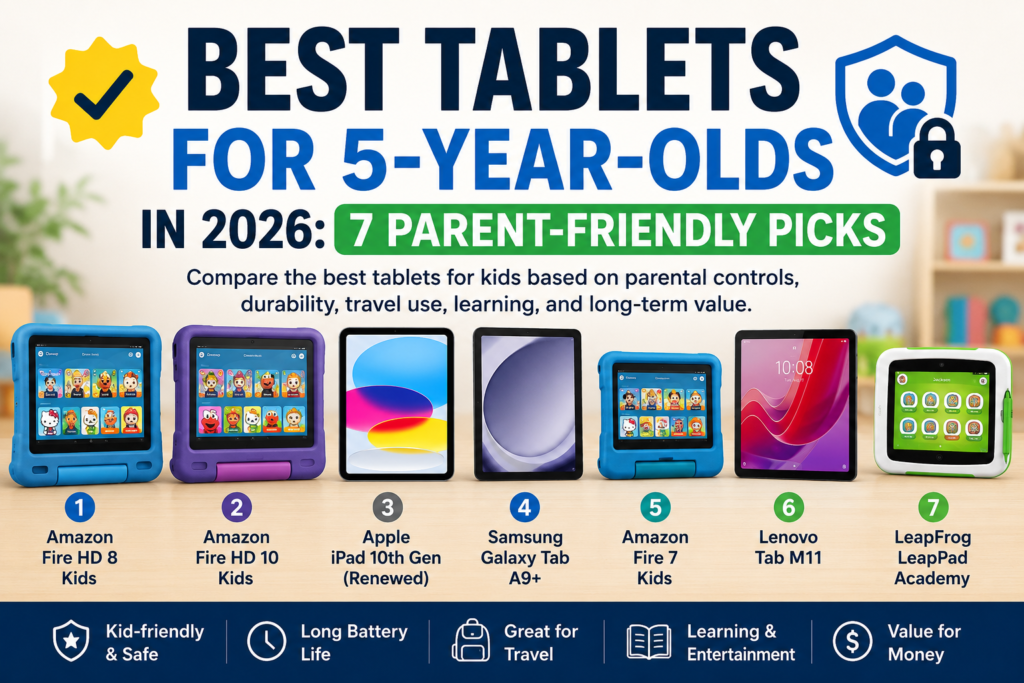
Our top overall pick is the Amazon Fire HD 8 Kids because it offers a practical balance of parental controls, durability, portability, battery life, and child-friendly content. However, families who want a larger screen, broader app access, or a tablet that can grow with an older child may prefer one of the other options below.
Quick Picks
- Amazon Fire HD 8 Kids — Best overall for most 5-year-olds who need strong parental controls, an included protective case, and simple setup
- Amazon Fire HD 10 Kids — Best for children who benefit from a larger screen for videos, reading, and learning apps
- Apple iPad 10th Generation (Renewed) — Best long-term option for families who want broad app access and future school use
- Samsung Galaxy Tab A9+ — Best Android option for families who want flexibility, a large screen, and a tablet that can grow with their child
- Amazon Fire 7 Kids — Best budget choice for a compact and child-ready first tablet
- Lenovo Tab M11 — Best for learning, drawing, reading, and longer activities on a large screen
- LeapFrog LeapPad Academy — Best for parents who want fewer distractions and a more focused early-learning experience
Comparison Table
| Product | Best for | Parent controls | Durability | Travel use | Main concern |
|---|---|---|---|---|---|
| Amazon Fire HD 8 Kids | Best overall | Excellent | Included kid-proof case | Compact and up to 13 hours | Fewer apps than iPad or Android |
| Amazon Fire HD 10 Kids | Large-screen use | Excellent | Included kid-proof case | Good battery, but heavier | Bulky for small hands |
| Apple iPad 10th Gen (Renewed) | Long-term use | Very good | Separate case needed | Powerful but larger | Higher cost and only 64GB |
| Samsung Galaxy Tab A9+ | Android families | Very good | Rugged case advised | Large screen, less portable | More setup required |
| Amazon Fire 7 Kids | Budget pick | Excellent | Included kid-proof case | Small and easy to carry | Slower performance |
| Lenovo Tab M11 | Learning and drawing | Good with Family Link | Folio included; rugged case recommended | Large screen and up to 10 hours | More setup and marketplace seller |
| LeapFrog LeapPad Academy | Fewer distractions | Simple and restricted | Bumper and shatter-safe screen | Compact and works offline | Limited apps as child grows |
1. Amazon Fire HD 8 Kids — Best Overall
For most families with a 5-year-old, the Amazon Fire HD 8 Kids is the easiest tablet to recommend. It is designed for children ages 3–7 and combines an 8-inch HD screen, a protective kid-proof case, built-in parental controls, 32GB of storage, and up to 13 hours of battery life.
Why parents may like it
The biggest advantage is convenience. Parents do not need to buy a separate protective case or spend a long time configuring the tablet before a child can use it. The included parental controls can help manage screen time, content access, and age-appropriate profiles.
Its 8-inch size is also easier for a 5-year-old to hold than a larger 10- or 11-inch tablet. That makes it more practical for car rides, restaurants, flights, and moving around the house.
What parents should know before buying
The Fire HD 8 Kids does not offer the same broad app selection as an iPad or a standard Android tablet. Families who rely heavily on specific Google Play apps, advanced drawing tools, or school-required applications may find it restrictive.
The included child-focused content is useful, but parents should also check the renewal terms for any bundled subscription before the trial period ends.
Screen-time and safety controls
This tablet is a strong option for parents who want to set daily limits, control what content a child can access, and reduce the chance of accidental purchases. It is better suited to a supervised child profile than handing a young child a standard adult tablet.
Travel and everyday use
With up to 13 hours of battery life, it should comfortably cover most road trips or flights without needing to be charged repeatedly. The protective case is also useful for everyday drops and rough handling.
Bottom line
Choose the Fire HD 8 Kids if you want the simplest all-in-one option for a 5-year-old. Skip it if your family needs full access to Apple or Google apps, or if you want a tablet that will still feel unrestricted several years from now.
2. Amazon Fire HD 10 Kids — Best Large-Screen Option
The Amazon Fire HD 10 Kids is a better fit for families who want a larger display for videos, picture books, educational apps, and longer learning sessions. It is designed for children ages 3–7 and includes a 10.1-inch 1080p Full HD display, 32GB of storage, a kid-proof case, parental controls, and up to 13 hours of battery life.
Why parents may like it
The larger screen is the main reason to choose this model over the Fire HD 8 Kids. Text, illustrations, videos, and learning activities are easier to see, which may be helpful for children who enjoy reading, drawing, or following guided lessons.
Parents also get the same simplified child profile and control tools found on the smaller Fire Kids models. This makes it easier to manage screen-time limits, content access, age filters, and purchasing restrictions without handing a child a standard adult tablet.
What parents should know before buying
The larger screen also makes the tablet heavier and bulkier. A 5-year-old may be comfortable using it on a table, lap desk, or tablet stand, but it can be less convenient to hold for long periods.
It also takes up more space in a travel bag and may feel oversized in restaurants, car seats, or other tight spaces. Families looking for the easiest tablet for a child to carry independently may prefer the Fire HD 8 Kids.
Screen-time and safety controls
The Fire HD 10 Kids is a strong option for parents who want a controlled environment rather than unrestricted access to the wider internet. Parents can create a child profile, set daily limits, manage content, and reduce the chance of accidental purchases.
The larger screen does not change the core parental-control experience, so the decision between the 8-inch and 10-inch models is mainly about comfort, portability, and how the tablet will be used.
Travel and everyday use
Battery life of up to 13 hours is enough for most long drives and flights. However, because the tablet is larger, it is better suited to use with a stand, seat-back holder, or flat surface.
For home use, the larger display is comfortable for shared viewing, video calls, reading, and educational activities. For frequent travel, the smaller Fire HD 8 Kids is easier to pack and hold.
Fire HD 10 Kids vs. Fire HD 8 Kids
Choose the Fire HD 10 Kids if your child mostly uses a tablet while seated and would benefit from a larger display.
Choose the Fire HD 8 Kids if portability, lighter weight, and easier handling are more important.
Bottom line
Choose the Fire HD 10 Kids if you want the same simple parental controls and protective setup as the Fire HD 8 Kids, but with a larger and sharper screen.
Skip it if your child needs a lightweight tablet that is easy to carry around independently.
3. Apple iPad 10th Generation — Best Long-Term Option
The Apple iPad 10th Generation is a strong long-term choice for families who want one tablet to remain useful beyond the preschool years. It features a 10.9-inch Liquid Retina display, an A14 Bionic chip, and 64GB of storage, making it more flexible than most child-focused tablets.
Why parents may like it
The biggest advantage is longevity. A 5-year-old can begin with simple learning apps, drawing, video calls, and age-appropriate entertainment, then continue using the same device for schoolwork, reading, creative apps, and more advanced activities later.
The wide app selection is another major benefit. Parents are less likely to run into compatibility problems with school apps, educational platforms, drawing tools, video services, or accessories.
This Amazon listing is for a Renewed model, so condition, warranty coverage, and included accessories may differ from a brand-new iPad.
What parents should know before buying
An iPad is not child-ready straight out of the box. Parents should budget for a rugged protective case and a screen protector before giving it to a young child.
It is also more expensive to replace if it is dropped or damaged. For a 5-year-old, a durable case should be treated as essential rather than optional.
The 64GB storage capacity may also feel limited over time if the tablet is used for many large games, downloaded videos, photos, or creative apps. Families planning to use the device for several years should manage storage regularly.
Screen-time and safety controls
Apple’s Screen Time tools allow parents to schedule downtime, set app limits, restrict purchases, control age-appropriate content, and manage communication settings for a child account.
These controls are powerful, but they require more setup than Amazon’s child-focused interface. Parents who want the simplest possible setup may prefer a Fire Kids tablet.
Travel and everyday use
The iPad offers strong performance and up to 10 hours of battery life, making it suitable for long drives, flights, video calls, drawing, reading, and school activities.
However, its 10.9-inch body is larger and heavier than an 8-inch child tablet. A stand, seat-back holder, or lap desk can make travel use more comfortable.
How long can a child use it?
This is the main reason to choose an iPad. It is more likely to remain useful through the early elementary years and beyond, provided it is protected from damage and storage is managed carefully.
The higher upfront cost may make sense for parents who would rather buy one flexible device than replace a simpler tablet after a few years.
Bottom line
Choose the iPad 10th Generation if long-term use, a wide app selection, strong performance, and school compatibility matter more than the lowest price.
Skip it if you want a fully child-ready tablet with a protective case and simplified parental controls included from day one.
4. Samsung Galaxy Tab A9+ — Best Android Option
The Samsung Galaxy Tab A9+ is a strong choice for families who prefer Android and want more flexibility than a child-focused Fire tablet. This 11-inch Wi-Fi model includes 64GB of storage and a book cover case, making it useful for videos, learning apps, reading, drawing, and general family use.
Why parents may like it
The biggest advantage is flexibility. Parents can use Samsung Kids to create a child-friendly environment while still keeping access to the wider Android app ecosystem when needed.
Samsung Kids allows parents to choose activities, set time limits, and monitor usage. This makes the tablet suitable for both supervised play and educational use.
The 11-inch display is also useful for picture books, video lessons, drawing apps, and shared viewing. Quad speakers can make videos and educational content easier to hear without relying on headphones all the time.
What parents should know before buying
The included book cover case is useful for standing the tablet up, but it is not the same as a rugged child-proof case. Parents should consider replacing it with a thicker shock-resistant case before giving the tablet to a 5-year-old.
The tablet also requires more setup than an Amazon Fire Kids model. Parents should configure Samsung Kids or Google Family Link, restrict purchases, review browser access, and approve apps before allowing independent use.
The 64GB storage capacity should be enough for basic apps and streaming, but families who download many games, videos, or learning materials may need to manage storage more carefully.
Screen-time and safety controls
Samsung Kids provides a child-friendly space where parents can choose which activities are available, set time limits, and review usage.
Google Family Link can provide additional controls, including app approvals, screen-time limits, purchase restrictions, and supervised account management.
These tools are more flexible than Amazon’s simplified child profile, but they require more initial setup from the parent.
Travel and everyday use
The large screen is comfortable for videos, reading, learning activities, and drawing. It is also useful for longer sessions at home or during road trips.
However, the 11-inch size may feel large and heavy in small hands. A seat-back holder, lap desk, or tablet stand can make travel use more comfortable.
The included book cover can help support the tablet on a table, but it does not provide the same drop protection as a dedicated child-proof case.
How long can a child use it?
The Galaxy Tab A9+ can remain useful beyond the preschool years because it is not limited to a child-only platform.
As the child grows, parents can gradually expand app access and use the tablet for schoolwork, reading, video calls, creative apps, and general entertainment.
This makes it a better long-term option than a basic child-focused tablet, provided it is protected from damage.
Bottom line
Choose the Samsung Galaxy Tab A9+ if you want Android flexibility, a large display, strong parental-control options, and a tablet that can grow with your child.
Skip it if you want a fully child-ready package with a rugged case and simplified setup included from the start.
5. Amazon Fire 7 Kids — Best Budget Pick
The Amazon Fire 7 Kids is a practical first tablet for families who want a child-ready device at a lower price than the larger Fire Kids models. It is designed for children ages 3–7 and includes a 7-inch display, 16GB of storage, parental controls, a kid-proof case, and up to 10 hours of battery life.
Why parents may like it
The biggest advantage is simplicity. Parents do not need to buy a separate protective case or spend a long time creating a basic child-friendly setup.
Its compact size is also easier for a 5-year-old to hold and carry. It fits more easily into backpacks, travel bags, and car-seat organizers than a larger 10- or 11-inch tablet.
For families buying a first tablet or trying to keep the initial cost low, it offers the essential features without paying for a larger display or more powerful hardware.
What parents should know before buying
The Fire 7 Kids is slower than the Fire HD 8 Kids and Fire HD 10 Kids. Apps may take longer to open, and more demanding games or multitasking may feel less responsive.
The 7-inch display is also less comfortable for long reading sessions, drawing, or shared viewing. It works best for shorter activities, videos, books, music, and basic learning apps.
The 16GB storage capacity can fill up quickly. Parents who download many videos, games, or learning apps may need to manage storage carefully or add a compatible microSD card.
Screen-time and safety controls
Parents can create a child profile, set daily time limits, control content access, set educational goals, and reduce the chance of accidental purchases.
The parental-control system is similar to the one used on the larger Fire Kids tablets, which makes it easier for parents who want a simple and controlled child environment.
Travel and everyday use
The compact size is the Fire 7 Kids’ biggest advantage for travel. It is easy to pack, comfortable for small hands, and useful for restaurants, car rides, hotel rooms, and shorter flights.
Battery life of up to 10 hours should cover many day trips and shorter journeys, although it does not last as long as the Fire HD 8 Kids.
The included case and built-in stand also make it easier to use on a table or seat-back tray.
How long can a child use it?
The Fire 7 Kids works best as an affordable starter tablet rather than a long-term family device.
A 5-year-old may use it comfortably for basic entertainment and learning, but the smaller screen, limited storage, and slower performance may feel restrictive as the child grows.
Families planning to keep the tablet for several years may get better long-term value from the Fire HD 8 Kids.
Bottom line
Choose the Fire 7 Kids if you want an affordable, compact, and child-ready first tablet with strong parental controls and an included protective case.
Skip it if faster performance, a larger screen, longer battery life, or several years of future use are more important.
6. Lenovo Tab M11, 11-inch, 4GB RAM, 128GB, Folio Case
The Lenovo Tab M11 is a flexible Android tablet for families who want a larger screen for learning apps, drawing, reading, videos, and general family use. This model includes an 11-inch display, 4GB of RAM, 128GB of storage, and a folio case.
Why parents may like it
The large display gives children more room for drawing, tracing letters, completing educational activities, and watching guided lessons.
The 128GB storage capacity is also useful for families who download videos, books, games, and learning apps for offline use.
Because it is a standard Android tablet, parents have access to a wider range of educational and creative apps than they would on a more restricted child-focused tablet.
What parents should know before buying
The included folio case is useful as a stand, but it is not designed to protect the tablet from serious drops. Parents should consider purchasing a rugged child-proof case before giving it to a 5-year-old.
The tablet is also not child-ready out of the box. Parents need to create a supervised account, configure Google Family Link, restrict purchases, review browser access, and approve apps.
Its 11-inch size may also feel heavy or awkward for a young child to hold without a stand or lap desk.
Screen-time and safety controls
Google Family Link can help parents approve apps, set daily limits, schedule downtime, restrict purchases, and manage a supervised child account.
These controls provide flexibility, but setup requires more time than the simplified parental controls included with a Fire Kids tablet.
Parents should test the child profile and restrictions before allowing independent use.
Travel and everyday use
The large screen is comfortable for videos, reading, drawing, and longer learning sessions. Battery life of up to 10 hours should cover many day trips, road journeys, and shorter flights.
However, the tablet is less portable than a 7- or 8-inch model. A seat-back holder, tablet stand, or lap desk will make travel use easier.
The included folio case is useful on a table, but a shock-resistant case is a better choice for everyday child use.
How long can a child use it?
The Lenovo Tab M11 can remain useful beyond the preschool years because it supports standard Android apps and is not limited to a child-only platform.
As the child grows, it can be used for schoolwork, reading, drawing, video calls, and family entertainment.
Its long-term value will depend on software support, physical protection, and whether 4GB of RAM remains sufficient for the apps the family uses.
Bottom line
Choose the Lenovo Tab M11 if you want a large Android tablet with generous storage for learning, drawing, and family use.
Skip it if you want a compact tablet, a rugged child-proof case, or the simplest possible parental-control setup.
7. LeapFrog LeapPad Academy Kids’ Learning Tablet, Green
The LeapFrog LeapPad Academy is a learning-focused tablet for parents who want fewer distractions and a more controlled experience than a standard Android tablet or iPad.
It is designed for children ages 3–8 and includes a 7-inch shatter-safe screen, a protective bumper with a built-in kickstand, a stylus, and more than 20 educator-approved learning apps.
Why parents may like it
The biggest advantage is focus. The tablet is designed around early learning rather than unrestricted entertainment, social media, or access to a large app store.
Included activities cover areas such as reading, math, science, spelling, creativity, puzzles, and problem-solving.
Parents may also appreciate that the device is ready for a young child to use without purchasing a separate protective case or spending a long time building a child-friendly interface.
What parents should know before buying
The LeapPad Academy is much more restricted than an iPad or standard Android tablet. That is helpful for reducing distractions, but it also limits the device’s flexibility.
Additional apps, games, videos, and books may require separate purchases. The included LeapFrog Academy trial may also become a paid subscription after the trial period, so parents should review the renewal terms.
The smaller screen and limited app ecosystem may feel restrictive as the child becomes older or begins using school-specific apps.
Screen-time and safety controls
Parents can set time limits, manage available apps, approve child-friendly websites, and gradually expand content as the child grows.
The LeapSearch browser provides a more controlled browsing environment than handing a young child unrestricted access to a standard web browser.
This makes the LeapPad Academy a good option for parents who prefer a closed and carefully managed learning environment.
Travel and everyday use
The 7-inch size is compact and easy for small hands to carry. The protective bumper, kickstand, and shatter-safe screen are useful for car rides, restaurants, hotel rooms, and everyday play.
Children can save selected activities for offline use, which can help during travel without reliable Wi-Fi.
Parents should still charge the device before long trips and download or save the required activities in advance.
How long can a child use it?
The LeapPad Academy is well suited to the preschool and early elementary stages, especially for children who benefit from guided educational content.
However, it may not remain useful as long as an iPad or standard Android tablet because its app selection and general-purpose features are more limited.
It is best viewed as a focused early-learning device rather than a tablet intended to last through several school years.
Bottom line
Choose the LeapPad Academy if you want a durable, learning-focused tablet with fewer distractions and simple parental controls.
Skip it if you need access to a broad app store, school platforms, advanced games, or a device that can grow into a general family tablet.
Final Thoughts on the Best Tablets for Kids
Overall, the best tablets for kids should balance parental controls, durability, app access, travel convenience, and long-term value.